Toronto permit data
Toronto building permit revisions and resubmissions
Published July 24, 2026
The short version
- A deficient application is rarely dead. Most problem files get an Examiner's Notice, and a targeted resubmission puts the file back into review.
- Resubmissions go through the City's online File Submission Hub, with revision bubbles on the changed pages and a response letter that answers every comment.
- Under Ontario's Building Code Act, the City must issue a permit for work that complies, and it must give its reasons when it refuses one.
- Each resubmission re-enters the review queue rather than resuming it, so the fastest files are the ones that clear every comment in a single pass.
How do building permit revisions work in Toronto?
Short answer: When Toronto Building finds problems with your application, you get an Examiner's Notice listing them, you correct the drawings, and you resubmit through the City's online File Submission Hub. The file then re-enters review. An outright refusal is rarer, comes with stated reasons, and can be disputed. Confirm the current process with Toronto Building.
Almost nobody's permit dies at the first review; it stalls there. The gap between the fast half and the slow tail of Toronto's permit queue is largely made of revision loops, and the loop is mostly in the applicant's control. Among the 30,910 Toronto permits issued in the trailing twelve months and currently on record, half were issued within 29 days of application, while one in ten waited beyond 176 days as of Oct 9, 2026. This guide covers what a deficiency notice means, how to resubmit properly, what your rights are if the City says no, and how to keep your file out of the tail.
What is an Examiner's Notice from Toronto Building?
An Examiner's Notice is the City's formal way of saying the review stopped on your file, not that it ended. In the City's own status vocabulary, it means your application was accepted, a plan examiner reviewed it, and a notice went out listing deficiencies or missing information, with the examiner now waiting on you. The City's plan review process page puts it plainly: if compliance is a problem, you are issued a notice documenting why the project does not comply.
Read the notice as a to-do list, not a verdict. It typically identifies the code provision or requirement behind each comment, and it contains your application number and an access code for resubmitting. Nothing moves until you respond, and the time the file sits waiting on your response is your time, not the City's. You can watch where your file stands through the City's application status search, or look up the property on PermitIndex to see everything on record at the address.
How do you resubmit revised drawings to the City?
Resubmission is electronic, through the Toronto Building Online Services File Submission Hub, using the application number and access code from your examiner. The mechanics matter, because a malformed resubmission is itself a delay. As the City currently describes the process:
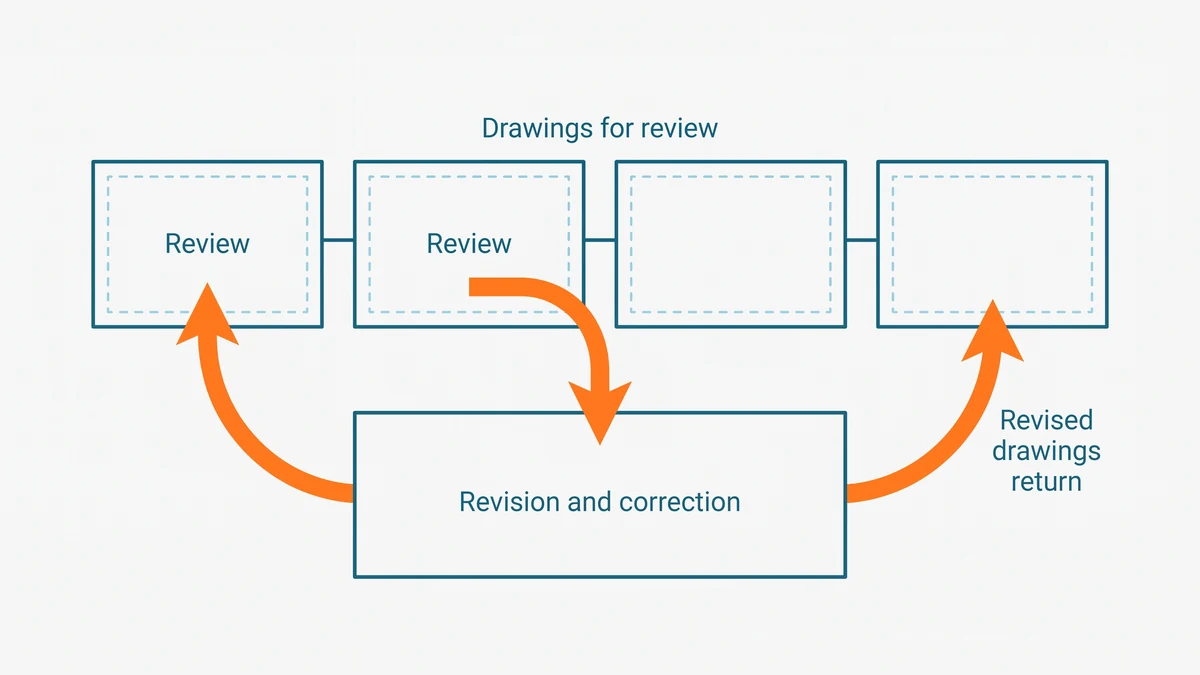
- Combine the drawings into a single PDF file, within the Hub's size limit.
- Mark every change with revision bubbles so the examiner can find what moved.
- Resubmit only the revised pages. Unaffected drawings do not need to go back in.
- Include a response letter that answers each comment in the notice, point by point, along with any new supporting documents such as engineer's letters.
- Expect one submission at a time. Once you upload, the Hub closes until the examiner reopens it.
The response letter is the underrated part. An examiner facing a clean letter that maps each comment to a bubbled change can clear the file in one pass. An examiner facing a silent pile of new drawings has to re-derive what changed, and ambiguity tends to generate another notice. If the comments point at your drawing set itself, read what Toronto actually requires in permit drawings before you redraw, and if the question is whether a designer or engineer must stamp the fix, see stamped drawings versus sketches in Ontario.
Can the City actually refuse your permit, and what are your rights?
A refusal is not a discretionary call. Under Ontario's Building Code Act, the chief building official must issue a permit when the proposed work complies with the Building Code and applicable law, and when refusing must tell you the reasons. Ontario's citizen's guide to building permits describes the obligation as issuing the permit or refusing it with all reasons given, within the legislated review period for a complete application.
Those reasons determine your next move. If the dispute is technical, whether your design sufficiently complies with the Building Code, you can take it to the Building Code Commission, an independent tribunal built for exactly that question. If the dispute is about some other decision of the official, an appeal lies to the Superior Court of Justice, and the window to file is short, measured in days from the decision. Most refusals never get that far: the cheaper path is usually to treat the reasons as a specification, fix the design, and resubmit. But the rights exist, and knowing them changes the conversation with the examiner from pleading to process. This is qualitative guidance, not legal advice; for a live dispute, confirm the current provisions and deadlines in the Act and get professional advice.
How do revisions change your timeline and fees?
Each resubmission re-enters review rather than resuming where it left off. The examiner must reopen the file, verify every response, and check that the fixes did not break something else, and there is no legislated clock on how fast a resubmission gets re-reviewed. That is a big part of why observed waits in the permit record run past the legislated review periods, and why the slow tail is so much longer than the median. The medians and the tail, by project type, are on the Toronto permit wait times page, and how long a building permit takes in Toronto walks through the whole timeline machinery.
Quotable: In Toronto's permit record, the revision loop is where the slow tail lives. A resubmission re-enters the review queue rather than resuming it, so every loop adds calendar weeks that the legislated review clock never counts.
Fees can also move. The City's fee schedule contemplates additional charges for repeated examinations and for revisions that expand a project's scope, and the amounts change over time, so check the current building permit fees page rather than trusting any dollar figure a blog quotes. Budget the loop in weeks and dollars both, and it becomes obvious why the first submission is worth over-preparing.
What if you need to change plans after the permit is issued?
Changing course mid-construction is normal; building the change without telling the City is the mistake. If the work will differ from the approved drawings, the change must be submitted to and accepted by the City before you build it, as a revision to the issued permit. The revised drawings go through review much like the original set, and in the City's status vocabulary a "Revision Issued" entry means a notice of change was submitted to the chief building official and accepted.
The temptation to build first and paper it later is real, especially for a small substitution late in a project. Resist it. An inspector comparing site to drawings will catch work that does not match, and an unapproved deviation invites a failed inspection, an order, and rework that costs far more than the review would have. The same logic that governs the original application governs the change: the City approves drawings, not intentions, so keep the drawings true. When in doubt about whether a change is big enough to need a revision, ask your examiner or Toronto Building before proceeding.
How do you stay out of the revision loop entirely?
The loop is mostly avoidable, and avoiding it is the single biggest schedule lever an applicant controls. The working rules:
- Submit a complete, code-referenced set the first time. Most notices trace back to incomplete or non-compliant drawings. The step-by-step application guide covers what a complete file looks like.
- Answer fast and answer everything. A notice that sits in your inbox for three weeks is three weeks added to your project. A response that addresses half the comments buys another full loop.
- Make the examiner's job mechanical. Bubbled revisions plus a point-by-point response letter turn a judgment call into a checklist.
- Keep changes upstream. Decisions changed on paper cost a review cycle; decisions changed after issuance cost a formal revision, and after construction, potentially rework.
- Plan around the tail anyway. Even clean files queue. Set contractor dates against the slow end of the range for your project type, not the middle.
None of this makes the City faster. It makes you absent from the part of the process where files go to sit.
How these numbers are calculated
The wait figures on this page render live from the City of Toronto's open dataset of active building permits, through the seo_wait_citywide function, which computes the median and ninetieth-percentile gap between each permit's recorded application date and issue date in SQL, over permits issued in the trailing twelve months. Records where the issue date precedes the application date are dropped, and no group under thirty permits is ever reported.
We publish medians, never averages: a handful of very large projects run for years and would drag an average far above what a typical applicant experiences. Two limits bound every figure here. The City publishes currently active permits, and records leave the dataset as projects close out, so these are permits presently on record, Toronto only, not a historical census. And they are observed issuance lags, not a City service standard. The process descriptions above summarize the City's published pages, linked at each claim, and can change; the City's own pages govern. Sourcing and licence details are on the data sources page.
Frequently asked questions
- Does an Examiner's Notice mean my Toronto permit application was rejected?
- No. An Examiner's Notice means the review found items that need correction or more information, and the examiner is waiting for your response. The application stays open, and a complete resubmission that addresses every comment moves it back into review. A formal refusal is a different, rarer outcome that comes with stated reasons.
- How many times can I resubmit drawings for a Toronto building permit?
- There is no published cap on resubmissions, and files can loop through several rounds when responses only partly address the comments. Each round costs calendar weeks, and repeated reviews can attract additional fees under the City's fee schedule. The practical goal is to make the second submission the last one.
- Do I have to pay again when I resubmit permit drawings in Toronto?
- Sometimes. The City's fee schedule contemplates additional charges for repeated examinations and for revisions to a project beyond the original scope, and those fees change over time. Check the current building permit fee schedule on the City's site before you resubmit, and treat any figure you see elsewhere as stale.
- Can I appeal if Toronto refuses my building permit?
- Yes, and the route depends on the disagreement. Disputes about whether your design sufficiently complies with the technical requirements of the Building Code can go to the Building Code Commission, while other disputes over an official's decision can be appealed to the Superior Court of Justice within a short, fixed window. Get advice early, because the clock on an appeal is measured in days, not months.
- Can I change my plans during construction without going back to the City?
- No. If the work will differ from the approved drawings, the change needs to be submitted to and accepted by the City before you build it, as a revision to the issued permit. Building the change first risks a failed inspection and an order, and it can be far more expensive to fix in drywall than in drawings.